

Table of Contents
Mastering Claude Code: Complete Communication Guide
Claude Code is Anthropic’s official CLI (command-line interface) tool that brings AI-powered development directly into your workflow. Unlike ChatGPT or other web-based AI assistants, Claude Code operates as an intelligent development partner with direct file system access, automated workflows, and project-specific context awareness.
This guide teaches you how to communicate effectively with Claude Code to maximize productivity and get professional results.
What is Claude Code?
Claude Code is fundamentally different from web-based AI chat.
Traditional AI Chat (ChatGPT, Web Claude)
- Gives you code to copy and paste
- No awareness of your project structure
- Starts fresh every conversation
- You manually apply suggestions
- Can’t execute commands or run tests
Claude Code (CLI Tool)
- Writes code directly into your files
- Understands your entire project
- Remembers project-specific rules
- Executes commands (git, gradle, npm, etc.)
- Runs tests and handles multi-step workflows
Example:
With ChatGPT:
You: "Add a login screen to my Android app"
ChatGPT: "Here's code for a login screen..."
You: [Copy, create file, paste, save, test]
With Claude Code:
You: "Add a login screen with email/password validation"
Claude Code: [Creates LoginActivity.kt, updates AndroidManifest.xml,
             adds validation logic, updates navigation, runs build]
You: [Review the changes, test]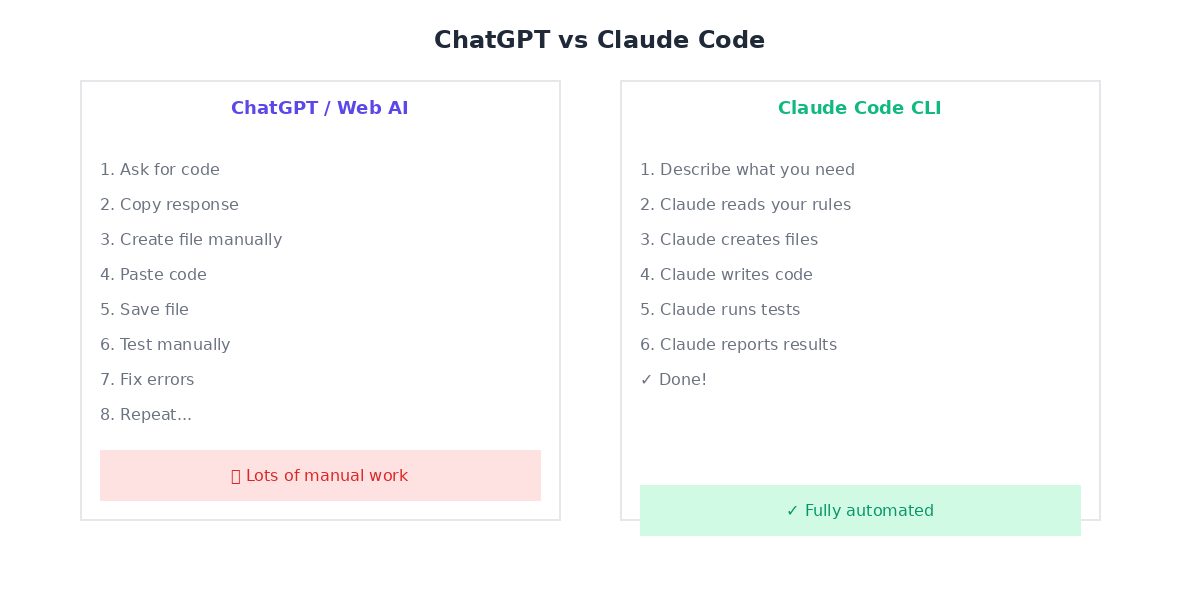
The .claude Folder: Your Project's Brain
The .claude folder in your project root stores project-specific context, rules, and configuration.
Folder Structure
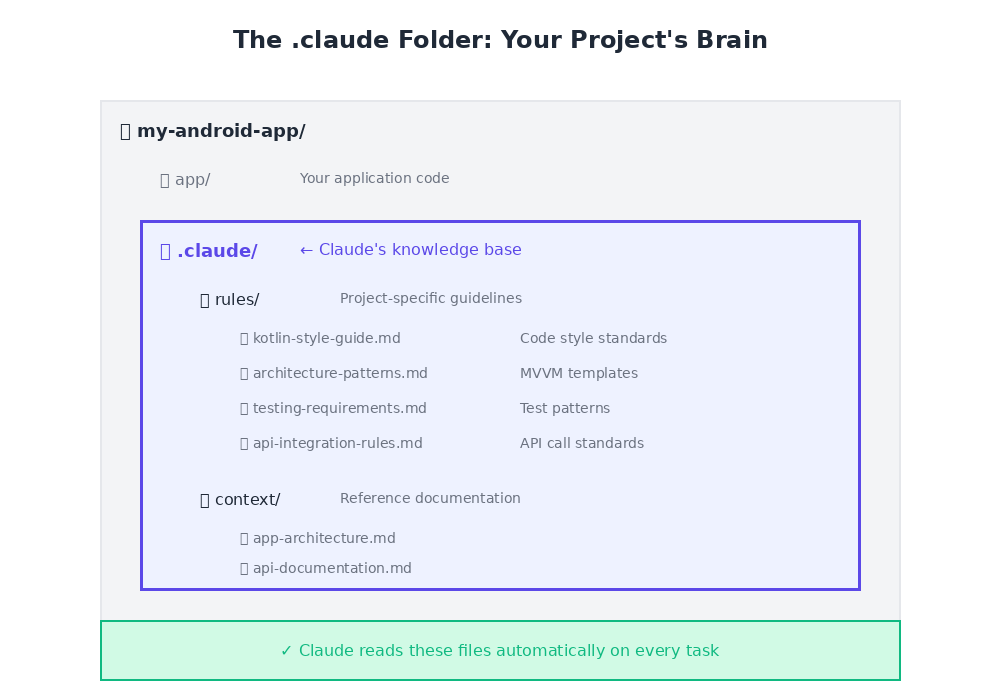
my-android-app/
├── app/
│   ├── src/
│   └── build.gradle
├── .claude/
│   ├── rules/              # Project-specific guidelines
│   │   ├── kotlin-style-guide.md
│   │   ├── architecture-patterns.md
│   │   ├── testing-requirements.md
│   │   └── api-integration-rules.md
│   └── context/            # Reference documentation
│       ├── app-architecture.md
│       ├── api-documentation.md
│       └── design-system.md
├── gradle/
└── build.gradle
The Rules Folder: Teaching Claude Your Standards
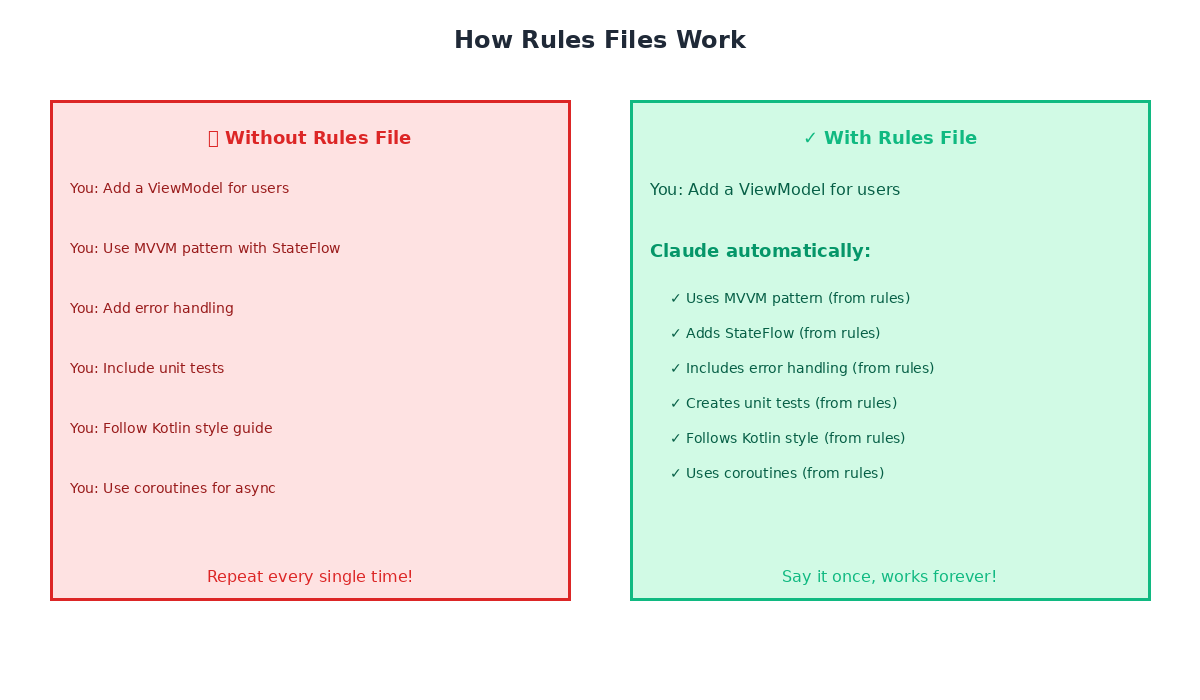
Rules are persistent instructions that Claude Code follows for ALL tasks in this project.
#### Example: Kotlin Style Guide
File: .claude/rules/kotlin-style-guide.md
# Kotlin Code Style Rules

## Naming Conventions

**✅ DO:**
- Classes: PascalCase (e.g., `UserRepository`, `LoginViewModel`)
- Functions: camelCase (e.g., `fetchUserData`, `validateEmail`)
- Constants: UPPER_SNAKE_CASE (e.g., `MAX_RETRY_COUNT`)

**❌ DON'T:**
- Use Hungarian notation
- Use underscores in variable names (except constants)

## Architecture

**ALWAYS use MVVM pattern:**
- ViewModels for business logic
- Repositories for data access
- Use Cases for complex operations

## Null Safety

**Prefer non-nullable types:**
// ✅ Good
val userName: String = “”
// ❌ Avoid
val userName: String? = null
## Testing

Every new feature MUST include:
- Unit tests for ViewModels
- Unit tests for Repositories
- UI tests for critical user flows
Why This Matters:
Once you create this rule file, Claude Code automatically:
- ✅ Uses MVVM pattern without being asked
- ✅ Names classes and functions correctly
- ✅ Creates unit tests for every new feature
- ✅ Follows your null safety preferences
You teach Claude once, it remembers forever (for this project).
Communication Best Practices
Rule #1: Be Specific, Not Polite
Claude doesn’t need pleasantries. Direct instructions get better results.

❌ Bad:
Hello! I was wondering if you might be able to help me add a feature
to my app if that's okay? I'd like to add user authentication but I'm
not sure how to approach it...
✅ Good:
Add user authentication with:
- Email/password login
- Token-based sessions
- Logout functionality
Follow the MVVM pattern in .claude/rules/architecture-patterns.md
Rule #2: Use Rules Files, Not Repeated Explanations
❌ Bad (Repeating Yourself):
Add a network call to fetch users. Remember to use Retrofit, add error
handling, use coroutines, follow the repository pattern, add loading
states, handle network errors...
✅ Good (Reference Rules):
Following .claude/rules/api-integration-rules.md:
Add a network call to fetch users from /api/users endpoint
The rules file already contains:
- Use Retrofit for network calls
- Error handling patterns
- Coroutine usage
- Repository pattern
- Loading/error states
Rule #3: Specify File Paths, Not Descriptions
❌ Bad:
Update the file where we keep the user view model✅ Good:
Update app/src/main/java/com/example/myapp/viewmodel/UserViewModel.ktRule #4: Let Claude Ask Questions
✅ Good Practice:
Add offline caching for user data. Ask questions if you need
clarification about the caching strategy before implementing.
Claude might ask:
- “Should we use Room database or SharedPreferences?”
- “What’s the cache expiration policy?”
- “Should offline data sync when network returns?”
Rule #5: Request Parallel Execution for Speed
❌ Bad (Sequential):
First, create the login screen.
Then create the signup screen.
Then add form validation.
Then add the API integration.
✅ Good (Parallel):
Do these in parallel:
1. Create LoginActivity with form validation
2. Create SignupActivity with form validation
3. Create AuthRepository for API calls
4. Add unit tests for all components
Claude Code can run multiple tasks simultaneously.
Markdown Files: Claude's Native Language
Claude Code reads and writes Markdown (.md) files natively. Use them for everything.
1. Project Documentation
File: .claude/context/app-architecture.md
# App Architecture

## Tech Stack
- Kotlin 1.9
- Jetpack Compose for UI
- Retrofit for networking
- Room for local database
- Hilt for dependency injection

## Architecture Pattern
MVVM with Repository pattern

## Modules
- `app` - Main application
- `data` - Data layer (repositories, API)
- `domain` - Business logic (use cases)
- `ui` - UI components and screens
2. Implementation Plans
File: feature-user-profile.md
# Feature: User Profile Screen

## Requirements
- Display user info (name, email, avatar)
- Edit profile functionality
- Upload avatar image
- Save changes to backend

## Implementation Steps
1. Create ProfileViewModel
2. Create ProfileRepository
3. Design UI with Jetpack Compose
4. Add image picker integration
5. Implement update API call
6. Add unit tests
7. Add UI tests

## API Endpoints
- GET /api/user/profile
- PUT /api/user/profile
- POST /api/user/avatar
3. Task Lists
File: tasks.md
# Sprint Tasks

## In Progress
- [ ] Implement user login
- [ ] Add form validation

## Blocked
- [ ] Push notifications (waiting for API keys)

## Done
- [x] Setup project structure
- [x] Configure Retrofit
- [x] Add Hilt dependency injection
Advanced Techniques
1. Architecture Pattern Rules
File: .claude/rules/architecture-patterns.md
# Architecture Patterns

## MVVM Requirements

### ViewModel
class UserViewModel @Inject constructor(
private val userRepository: UserRepository
) : ViewModel() {
private val _uiState = MutableStateFlow(UiState.Loading)
val uiState: StateFlow = _uiState.asStateFlow()
fun loadUser(userId: String) {
viewModelScope.launch {
_uiState.value = UiState.Loading
userRepository.getUser(userId)
.onSuccess { user ->
_uiState.value = UiState.Success(user)
}
.onFailure { error ->
_uiState.value = UiState.Error(error.message)
}
}
}
}
### Repository Patterninterface UserRepository {
suspend fun getUser(userId: String): Result
}
class UserRepositoryImpl @Inject constructor(
private val api: UserApi,
private val dao: UserDao
) : UserRepository {
override suspend fun getUser(userId: String): Result {
return try {
val user = api.getUser(userId)
dao.insert(user)
Result.success(user)
} catch (e: Exception) {
// Fallback to cached data
dao.getUser(userId)?.let {
Result.success(it)
} ?: Result.failure(e)
}
}
}
## Testing Requirements

Every ViewModel MUST have tests for:
- Loading state
- Success state
- Error state
- Edge cases
Result: Every time Claude creates a ViewModel or Repository, it automatically follows this exact pattern.
2. API Integration Rules
File: .claude/rules/api-integration-rules.md
# API Integration Rules

## Retrofit Setup

Always use:
- Kotlin Coroutines (suspend functions)
- Result wrapper for error handling
- Custom deserializers for complex types

## Error Handling
sealed class ApiResult {
data class Success(val data: T) : ApiResult()
data class Error(val message: String, val code: Int? = null) : ApiResult()
object Loading : ApiResult()
}
## Network Interceptors

Add these interceptors to all API clients:
1. Authentication (Bearer token)
2. Logging (debug builds only)
3. Error handling

## Offline Support

All API responses MUST be cached locally with Room database.
3. Testing Requirements
File: .claude/rules/testing-requirements.md
# Testing Requirements

## Unit Tests

**Every ViewModel test must verify:**
@Test
fun loadUser emits loading then success() = runTest {
// Given
val expectedUser = User(id = “1”, name = “Test”)
coEvery { repository.getUser(any()) } returns Result.success(expectedUser)
// When
viewModel.loadUser(“1”)
// Then
viewModel.uiState.test {
assertEquals(UiState.Loading, awaitItem())
assertEquals(UiState.Success(expectedUser), awaitItem())
}
}
@Test
fun loadUser handles error() = runTest {
// Given
val error = Exception(“Network error”)
coEvery { repository.getUser(any()) } returns Result.failure(error)
// When
viewModel.loadUser(“1”)
// Then
viewModel.uiState.test {
assertEquals(UiState.Loading, awaitItem())
assertTrue(awaitItem() is UiState.Error)
}
}
## UI Tests

Critical user flows require Espresso/Compose UI tests.
Real-World Example: Complete Workflow
Task: "Add user login feature"
Step 1: Check Existing Rules
What rules do we have for authentication and MVVM?Claude checks .claude/rules/ and finds:
- architecture-patterns.md (MVVM structure)
- api-integration-rules.md (auth endpoints)
- testing-requirements.md (test patterns)
Step 2: Implement with Context
Following the architecture and API rules:

Add user login feature with:
- LoginActivity with Jetpack Compose UI
- Email/password validation
- LoginViewModel following MVVM pattern
- AuthRepository for API calls
- Token storage in encrypted SharedPreferences
- Unit tests for all components

Update .claude/context/app-architecture.md with the new auth flow.
Step 3: Claude’s Actions
Claude automatically:
1. Creates LoginActivity.kt with Compose UI
2. Creates LoginViewModel.kt following exact MVVM pattern from rules
3. Creates AuthRepository.kt with proper error handling
4. Adds token storage with security best practices
5. Creates unit tests for ViewModel and Repository
6. Updates AndroidManifest.xml
7. Updates navigation
8. Runs ./gradlew test to verify tests pass
9. Updates architecture documentation
All done automatically, following your documented patterns.
Common Mistakes to Avoid
❌ Don't: Repeat Information
Bad:
Add a new API call. Remember to use Retrofit, handle errors properly,
use coroutines, follow the repository pattern... [repeats every time]
Good:
Read .claude/rules/api-integration-rules.md
Add API call for GET /api/products
❌ Don't: Use Vague References
Bad:
Fix the thing we discussed earlier in the view modelGood:
In UserViewModel.kt line 45: Fix the null pointer exception when
user data is empty
❌ Don't: Assume Claude Remembers Across Sessions
Rules folder: ✅ Persists forever
Chat history: ⚠ May be summarized
Solution: Document important decisions in .claude/rules/ or .claude/context/
❌ Don't: Mix Multiple Unrelated Tasks
Bad:
Add login screen and also refactor the database and update the API
client and fix that bug in the profile screen...
Good:
Add login screen with email/password validation. When done, I'll
give you the next task.
Pro Tips
1. Build Your Rules Library Gradually
Don’t create all rules at once. Add them as patterns emerge:
First time:
Add a network call to fetch products. Use Retrofit with coroutines,
handle errors with Result wrapper, cache with Room.
Second time:
This follows the same pattern as the products call. Document this
API pattern in .claude/rules/api-integration-rules.md
Third time onwards:
Following api-integration-rules.md, add call to /api/ordersClaude now automatically applies the documented pattern.
2. Use Descriptive File Names
✅ Good:
kotlin-style-guide.mdarchitecture-patterns.mdtesting-requirements.mdapi-integration-rules.md
❌ Bad:
rules.mdnotes.mdstuff-to-remember.md
3. Include "Why" Explanations
Good Rule:
## Always Use Sealed Classes for UI Statesealed class UiState {
object Loading : UiState()
data class Success(val data: T) : UiState()
data class Error(val message: String) : UiState()
}
**Why:** Sealed classes provide compile-time exhaustive when() checks,
preventing bugs from unhandled states.
Claude understands the reasoning and applies it to similar situations.
4. Create Checklist-Style Rules
File: .claude/rules/pre-commit-checklist.md
## Before Committing Code

- [ ] All unit tests pass (`./gradlew test`)
- [ ] No lint errors (`./gradlew lint`)
- [ ] Code follows Kotlin style guide
- [ ] New features have tests
- [ ] API changes documented
- [ ] No hardcoded strings (use strings.xml)
- [ ] No TODO comments in production code
Claude can verify each item before completing a task.
5. Document Project Conventions
File: .claude/rules/naming-conventions.md
# Naming Conventions

## Files
- Activities: `*Activity.kt` (e.g., `LoginActivity.kt`)
- Fragments: `*Fragment.kt`
- ViewModels: `*ViewModel.kt`
- Repositories: `*Repository.kt`
- Use Cases: `*UseCase.kt`

## Layouts (if using XML)
- Activities: `activity_*.xml`
- Fragments: `fragment_*.xml`
- List items: `item_*.xml`

## Composables
- Screens: `*Screen()` (e.g., `LoginScreen()`)
- Components: PascalCase (e.g., `UserCard()`)
Example: Android App Development Session
Project: Shopping app with product catalog and checkout
Session Start
I'm working on adding a product detail screen. The app follows MVVM
with Jetpack Compose. Check .claude/rules/ for our patterns.
Claude's Automatic Actions
Claude reads:
.claude/rules/architecture-patterns.md– Learns MVVM structure.claude/rules/kotlin-style-guide.md– Learns naming conventions.claude/rules/testing-requirements.md– Learns test patterns.claude/context/app-architecture.md– Understands project structure
Your Request
Create a product detail screen showing:
- Product image
- Name, price, description
- Add to cart button
- Quantity selector

Follow our established patterns.
Claude Creates
Without you specifying:
ProductDetailViewModel.kt– Following exact MVVM pattern from rulesProductDetailScreen.kt– Jetpack Compose UIProductDetailScreenTest.kt– Unit tests for all states- Updates navigation graph
- Follows naming conventions automatically
- Uses proper error handling from API rules
- Runs tests before reporting completion
You didn’t have to explain MVVM, testing patterns, naming, or architecture. Claude learned from your rules folder.
Measuring Success
Signs You're Using Claude Code Effectively
✅ You rarely repeat the same instruction twice
✅ Claude completes complex features without clarification
✅ Code quality is consistent across all generated files
✅ New rules are added based on patterns you discover
✅ Tasks that took hours now take minutes
✅ You can delegate entire features, not just code snippets
Signs You Need Better Rules
⚠ Claude keeps asking the same questions
⚠ You’re typing the same context repeatedly
⚠ Results are inconsistent between sessions
⚠ Generated code doesn’t match your style
⚠ You’re manually fixing the same issues repeatedly
Solution: Document the pattern in .claude/rules/
Getting Started Checklist
Week 1: Foundation
- ☐ Create
.claude/rules/folder in your project - ☐ Document your architecture pattern
- ☐ Create a code style guide
- ☐ Add one API integration rule
Week 2: Build Habits
- ☐ Identify instructions you’ve repeated 3+ times
- ☐ Convert them into rule files
- ☐ Test: Give Claude a task, verify it follows your rules
- ☐ Add a testing requirements document
Week 3: Refine
- ☐ Review generated code for patterns
- ☐ Document any missing conventions
- ☐ Add context documentation for complex systems
- ☐ Create pre-commit checklist rules
Week 4: Mastery
- ☐ Rules cover 80% of common tasks
- ☐ Claude rarely needs clarification
- ☐ Code quality is production-ready
- ☐ Share your rules with team members
Summary: The Claude Code Mindset
Think in Systems, Not Tasks
Comparison:
Traditional Approach | Claude Code Approach
———————|———————
"Give me login code" | "Implement login feature"
Copy, paste, test | Claude builds it end-to-end
Explain patterns each time | Patterns in rules folder
Hope it remembers | Everything documented
Manual file management | Automated workflows
The Golden Rules
1. Document once, use forever – Rules persist across all sessions
2. Be direct, not polite – Skip pleasantries, state requirements clearly
3. Use file paths – No ambiguity about what to update
4. Let Claude handle complexity – Multi-step workflows are its strength
5. Build rules gradually – Start simple, add patterns as you discover them
Common Use Cases
Android Development
- Feature implementation (login, profile, checkout)
- UI creation with Jetpack Compose
- ViewModel and Repository setup
- Unit test generation
- API integration
- Database migrations
- Navigation updates
iOS Development
- SwiftUI view creation
- MVVM architecture
- Network layer setup
- Core Data integration
- Unit testing
- UI testing
Web Development
- React component creation
- API endpoint implementation
- Database schema updates
- Test coverage
- Build configuration
DevOps
- CI/CD pipeline updates
- Docker configuration
- Deployment scripts
- Infrastructure as code
Next Steps
1. Create your .claude folder – Start with one rule file
2. Document one pattern – Your most-repeated instruction
3. Test it – Give Claude a task that should use the rule
4. Iterate – Add more rules as you discover patterns
5. Share – Team members can use the same rules folder
Remember: Claude Code isn’t just a smarter chatbot—it’s an automated development partner. Invest time in teaching it your standards through rules files, and watch your productivity multiply.
Additional Resources
- Claude Code Official Documentation
- Example .claude Rules Repositories
- Community forums and discussions
Ready to get started? Create your first .claude/rules/ folder today and document your first pattern. Your future self will thank you.